
Credit and udhaar management software for shops
Replace the khata notebook with a ledger that knows who owes you, how much, since when and for which invoice.
Credit is part of doing business. Losing track of it should not be.
Selling on credit builds loyalty, but a paper khata makes it easy to forget a balance, argue about an amount or lose a page. When customers owe you money and you also owe your suppliers, the picture gets even harder to see.
In Bajori Pro, credit is not a separate notebook. When a customer takes goods on credit, the balance is created from the invoice itself. Every payment you receive is recorded against it, so the remaining amount is always correct.
How credit works in Bajori Pro
Linked to the invoice
Every credit balance comes from a real invoice, so there is never any doubt about what the customer bought.
A ledger for each customer
Open a customer and see every charge and payment in order, with the balance at the end.
Partial payments
Record part payments as they arrive. The remaining balance updates and the credit closes when it reaches zero.
Overdue alerts
Choose after how many days credit counts as overdue. Overdue balances stand out on the Credit page.
Debit for suppliers
Debit works the same way for what you owe your suppliers, linked to your purchases.
One clear summary
The financial summary report shows what is owed to you and what you owe, in one place.
See every pending balance at a glance
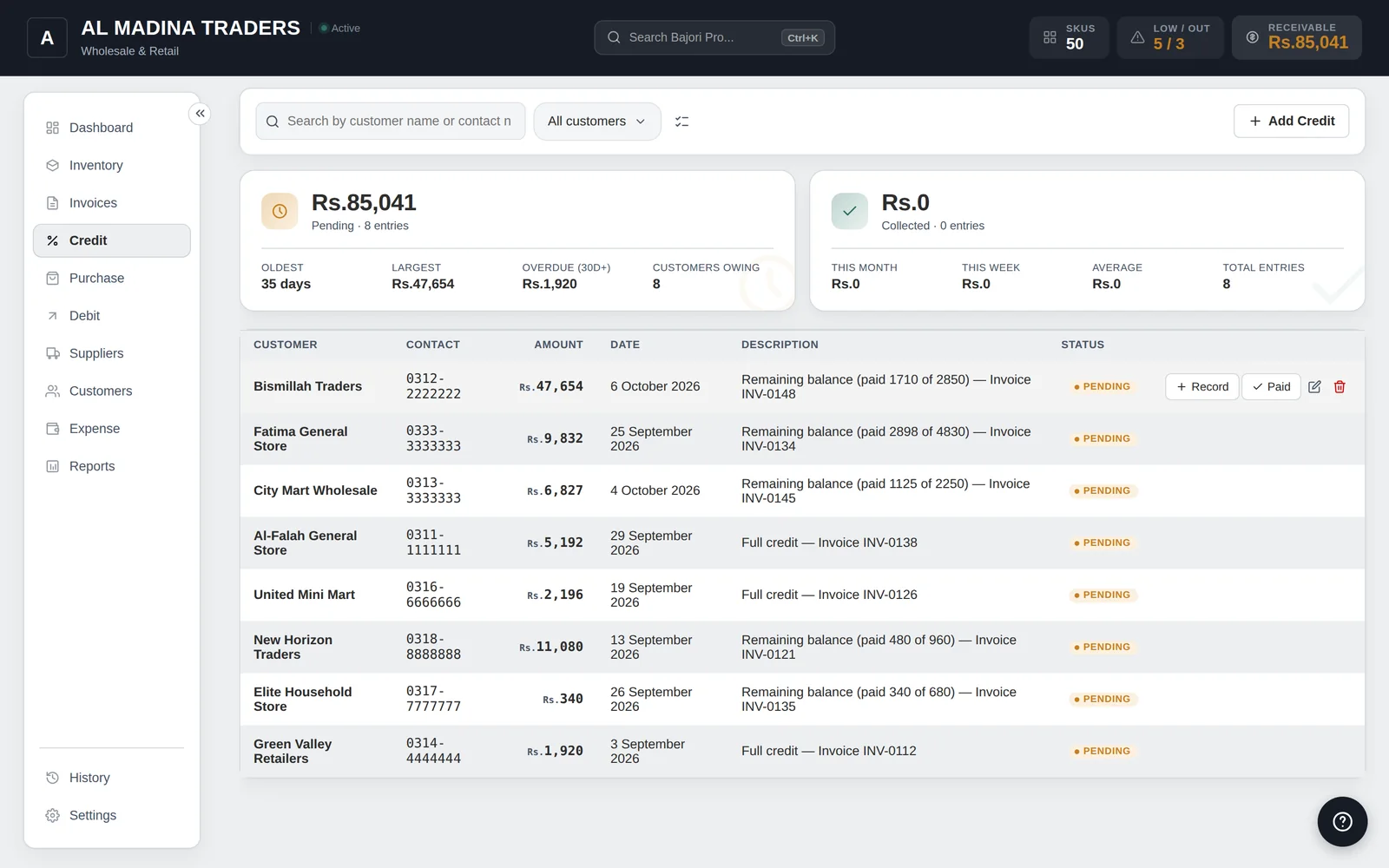
The Credit page lists pending balances with customer, amount, date and status, so you know exactly who to call first.
- Customer, amount, date and status in one list
- Payments recorded against the original invoice
- Outstanding balance on every customer profile
- Print or export the report when you need it
Common questions
What do udhaar and khata mean here?
They are everyday words for selling on credit and keeping a running account for each customer. Bajori Pro does the same job as a khata, with the invoice and payment details attached to every entry.
Can a customer pay in instalments?
Yes. Record as many partial payments as you need. The balance reduces each time and the credit is cleared when it reaches zero.
Can I see how much I owe my suppliers?
Yes. Debit tracks what you owe suppliers, in the same way credit tracks what customers owe you.
Will the app send reminders to my customers?
No. Bajori Pro works offline and does not send messages. It shows you who is overdue so you can call or message them yourself.
Related
Invoice and billing
Six invoice templates, 80 mm receipts, discounts, tax and partial payments.
Learn more →Retail shops and general stores
Barcode scanning, quick billing, low-stock alerts and customer ledgers.
Learn more →Wholesalers and distributors
Bulk units, supplier purchases and large credit balances in one place.
Learn more →Try Bajori Pro on your own computer
Download the free demo, explore a full sample business, and activate when you are ready.